Scrolling screenshot for Android

Scroll once. Keep the whole page.

LongShot records your screen while you scroll, then stitches it into a single lossless PNG. No length cap. Only your storage sets the limit.

Free · Android 8.0 or newer

Format
Lossless PNG
Length
No cap
Account
None

How a long shot is made

  1. Step 1 of 4

    Scroll.

    Tap Start capture, then scroll any app with your own finger — or turn on auto-scroll and let LongShot scroll for you. The auto-scroll service performs scroll gestures only and cannot read your screen.

  2. Step 2 of 4

    Stitch.

    Frames join into one continuous image while you scroll, on your phone, and are saved as a lossless PNG.

  3. Step 3 of 4

    Edit.

    Crop, annotate, cover. One tap on Hide personal data covers the email addresses and card numbers it finds on the page.

  4. Step 4 of 4

    Share.

    Save the PNG, export a PDF, copy the text, or save a copy to Drive.
Inside the editor

What you can do with a capture, and which tools ask you to watch an ad first.

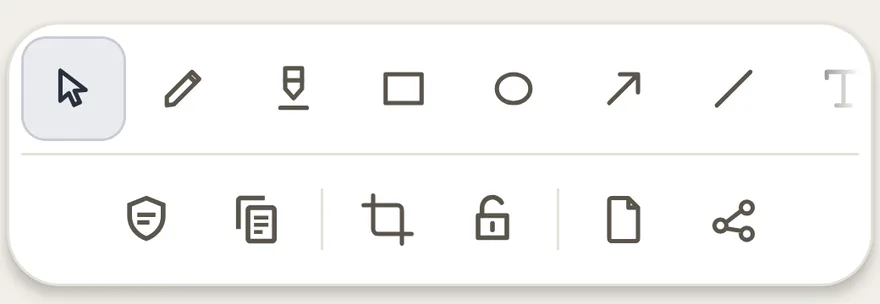
The LongShot editor toolbar: select, pen, highlighter, rectangle, ellipse, arrow, line and text tools above; hide personal data, copy text, crop, unlock move mode, export PDF and share below.
The editor toolbar.

Always free

No ad needed
  • CropWith ratio presets.
  • AnnotatePen, highlighter, shapes, arrows and text.
  • Pixelate or black outBlack out hides what is under it for good. Pixelate only softens it, and text under it can often still be read.
  • Hide personal dataOne tap. On-device text recognition finds what to cover. Latin script only.
  • Copy textLift the text out of the capture.
  • Export PDFA long capture becomes pages.
  • Save a copy to DriveThrough Android’s own file picker.
  • Dark mode

Premium tools

Watch one rewarded ad, get three uses
  • Smart SplitCuts a long capture into parts sized for sharing.
  • Watermark with dateStamps a purpose and today’s date across the image.
  • Share backdrop cardSets the capture on a coloured card with a margin and rounded corners.
  • Cut out a sectionRemove a stretch from the middle of the capture.
  • Colour and blur redactionTwo more ways to cover an area.

Premium tools are unlocked with a rewarded ad from Google AdMob. There is no payment.

Privacy

Your screenshots stay on your phone.

  • It all happens on the device.Capturing, editing and text recognition run on your phone. LongShot never uploads your screenshots.
  • No account, no sign-up.Open the app and capture.
  • Auto-scroll is optional, and off.Turn it on and LongShot scrolls for you during a capture. Its service performs scroll gestures only and cannot read your screen.
  • The internet is used for ads.LongShot’s own code uses it only for the Google AdMob rewarded ads that unlock the premium tools, and their consent form. Google’s bundled text-recognition component may also send Google basic diagnostics — never your screenshots or their text. What Google’s ad SDK may collect is listed in the privacy policy.

Read the privacy policy

Good to know

Honest limits, so nothing surprises you.

  • Pause videos before you capture.Pausing any video or animation first is the most useful thing you can do for a clean result.
  • Secure screens come out black.Apps and video that block screen capture, such as DRM-protected video, are recorded black. That is Android, not the app.
  • A playing video can leave a seam.The area of a video can be assembled from several moments.
  • Very fast flicks can lose part of the page.If the capture loses its place and stays lost, the floating bar says “Lost the page” so you can scroll back. Once it is saved, a notification says when the image is not complete — that message needs notifications to be on. A slow, steady scroll keeps the capture up with you far better, though it is no guarantee of a complete image.
  • Text recognition reads Latin script only.Copy text and Hide personal data do not recognise Arabic or other scripts.
  • Android 8.0 or newer.Needed to run LongShot.

Try it on the longest page on your phone.

Get it onGoogle Play

Free · Android 8.0 or newer